HPixel - Retro Mob Health Bar
A retro pixel health panel for the mob you are fighting.
Hit a mob, or get hit by one, and a pixel panel slides in at the top of the screen with its name, an icon and a live health bar. A few seconds after the fight it disappears on its own. The panel is drawn by a small resource pack and the boss bar, so players need no client mods.
Free download from SpigotMC. No purchase or account upgrade needed.
Spigot or Paper 1.21.4 or newer, including 26.xFull compatibility
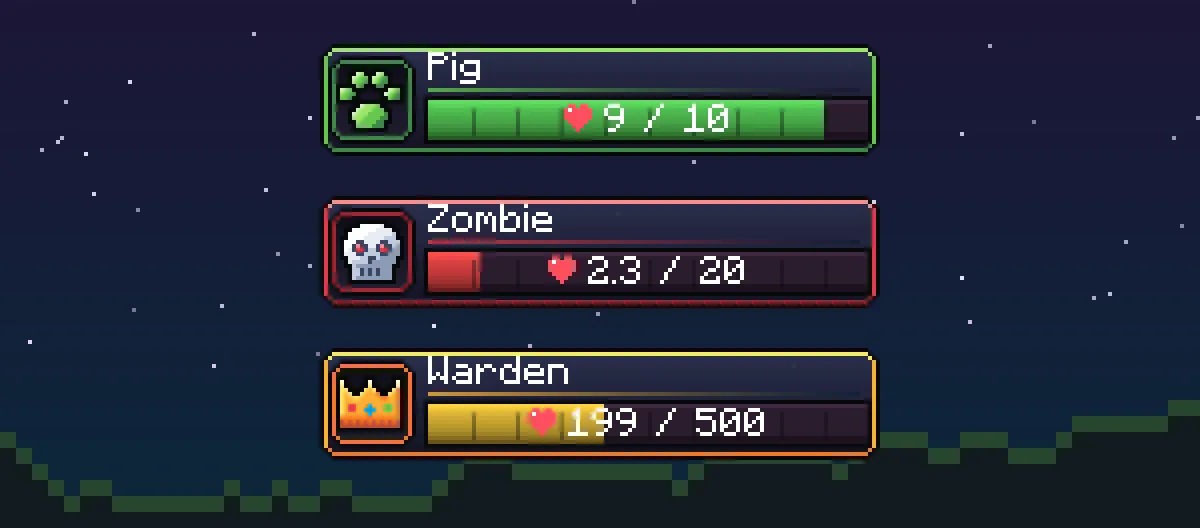

Rendered from the plugin's real boss bar output with the included resource pack.
Features
A health bar that looks like it belongs in the game.
Everything is configurable, and players can switch it off for themselves.
01Three panel styles
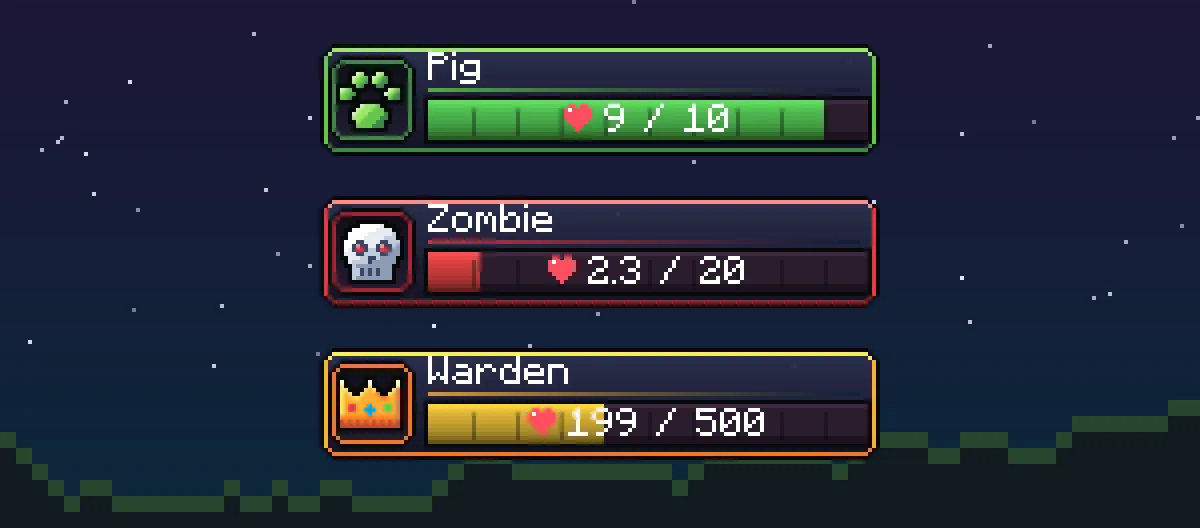
- Animal: a green frame with a paw icon.
- Enemy: a red frame with a skull.
- Boss: a gold frame with a crown, for the Warden, the Elder Guardian and any mob above a health threshold you choose.
- The Wither and the Ender Dragon keep their vanilla boss bar, so you never see two bars at once.
02Feels right in combat
- A pale damage trail holds for a moment after each hit and then drains smoothly.
- The bar turns from green to yellow to red as the mob gets weaker, with exact health numbers.
- Works with melee, bows, crossbows, tridents and every other projectile.
- Hides a few seconds after the fight, shortly after the kill, or when you walk away.
03Smart names and types
- Uses the mob's custom name, its MythicMobs name, or a clean vanilla name.
- Long names are shortened to fit the frame.
- Force a style per MythicMobs mob or entity type, or hide the panel for it.
- Citizens NPCs are skipped automatically.
04Configurable and lightweight
- Disabled worlds, colours, timings, view distance and ignored entity types in config.yml.
- Players can turn their own panel off with /hpixel, remembered across restarts.
- English and Czech included, every vanilla mob name can be translated.
- Resource pack ready for ItemsAdder, Nexo and Oraxen, or as a standalone pack.
Screenshots
See it in action.
Rendered from the plugin's real boss bar output with the included resource pack.
Requirements
Compatibility and installation.
Compatibility
- Server
- Spigot or Paper 1.21.4 or newer, including 26.x
- Java
- 21 or newer
- Resource pack
- Included, players need to accept it
- Optional
- MythicMobs
- Languages
- English, Czech
- Price
- Free
Installation overview
- 1Put HPixel-1.1.0.jar into the plugins folder and restart the server.
- 2Add the resource pack through ItemsAdder, Nexo, Oraxen or your own server pack.
- 3Join the server and hit a mob.
Changelog
Recent releases.
- 9 changes
v1.1.0Major
First public release
HPixel is out, free on SpigotMC, for Spigot and Paper 1.21.4 and newer.
Is HPixel free?
Yes. HPixel is a free download on SpigotMC.
Does it work on Spigot or only on Paper?
Both. HPixel runs on Spigot and on Paper and its forks, version 1.21.4 or newer, including 26.x.
I see squares or strange symbols instead of the panel.
The resource pack is not loaded. Check that the pack was accepted when joining and that you rebuilt it after copying the files.
My bosses already have a boss bar and the panels overlap.
Add those worlds to disabled-worlds, set bosses.show to false, or hide the panel for that mob in category-overrides.
Can players turn it off?
Yes. Every player can toggle their own panel with /hpixel. The setting is remembered across restarts.
Get HPixel - Retro Mob Health Bar.
A hand-drawn pixel panel with the mob name, an icon and a live health bar. No client mods, no clutter above every mob. Free on SpigotMC.
Free download from SpigotMC. No purchase or account upgrade needed.
- Step 1
Download on SpigotMC
HPixel is free. Download the archive from the resource page on SpigotMC.
- Step 2
Add the plugin and pack
Drop the jar into your plugins folder and add the included resource pack.
- Step 3
Get help
Follow the installation guide. If anything is unclear, open a ticket on our Discord.